 English
 عربى
عربى 中文
中文 Deutsch
 Español
 Eesti
Eesti فارسی
فارسی Français
 עִברִית
 हिन्दी
 Hrvatski
 Magyar
 Bahasa Indonesia
 Italiano
 日本語
日本語 한국어
한국어 Nederlands
 Polski
 Português
 Română
 Русский
 Svenska
 ภาษาไทย
 Türkçe
 Українська
 Tiếng Việt
Introduction
The “Which One Doesn’t Belong” math routine invites students to look at 4 images and explore the question of “Which one doesn’t belong and why?” Students are encouraged to find a meaningful reason for why each of the 4 images might indeed “not belong.” Christopher Danielson’s book Which One Doesn’t Belong? A Better Shapes Book and Mary Bourassa’s website Which One Doesn’t Belong have helped propel this math routine into classrooms around the world. The Polypad version of this routine is inspired by their work and by the many other educators around the world that have shared different versions of “Which One Doesn’t Belong” (WODB). Please take time to explore both resources from Christopher and Mary linked above to learn more about this math routine.
This blog post by Mary describes her process in creating and vetting a WODB. Mary writes, “I consider it a strong WODB if 3 of the items share a characteristic that is not present in the 4th.” Read more in the blog post to learn about the care and thought Mary, Christopher, and others take in authoring a WODB.
Our Approach
The Polypad WODB space presents another way to create a WODB routine for students. Rather than publishing authored WODB images, our space randomizes different Polypad tiles to create unique WODB routines each time the Generate button is pressed.
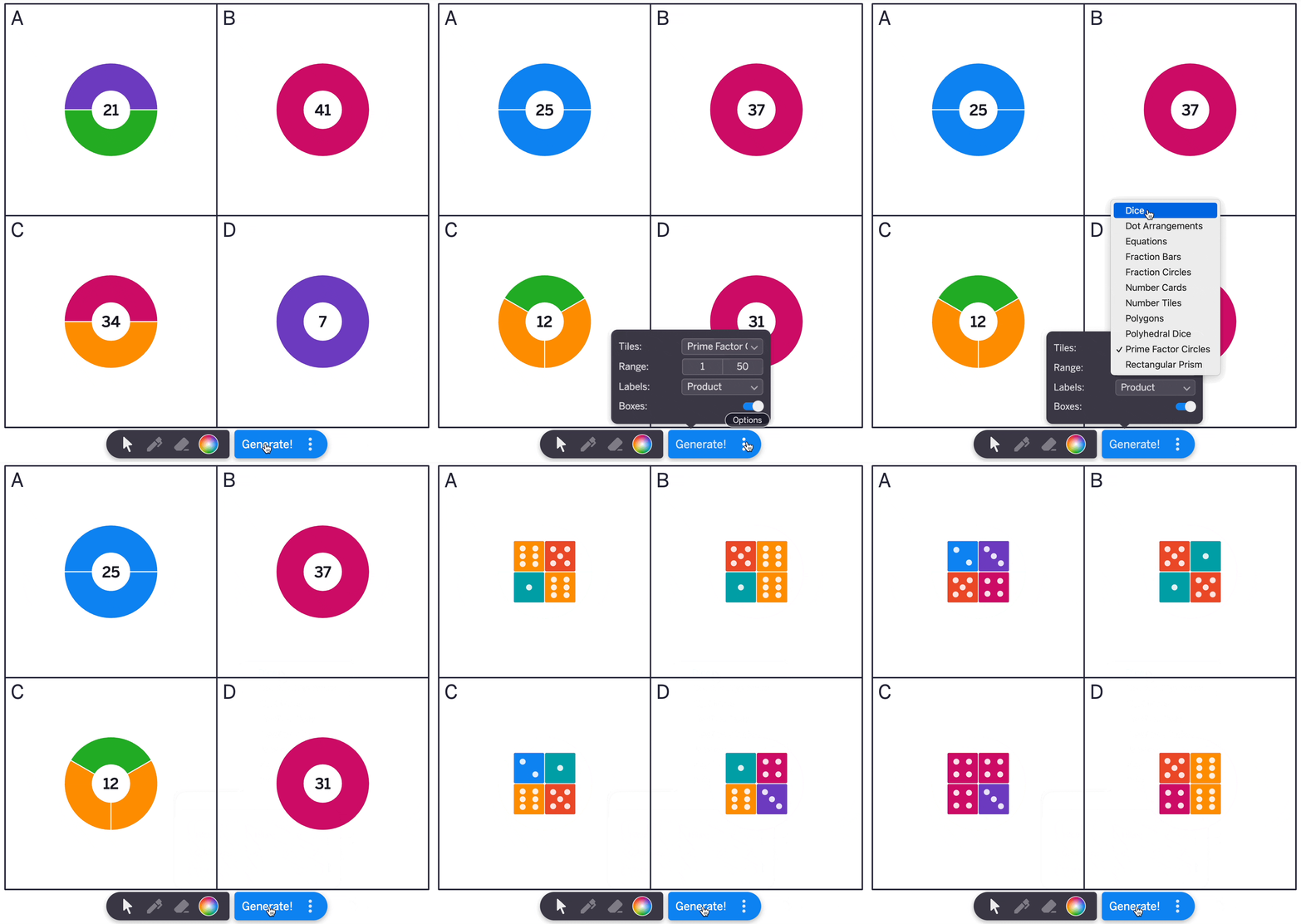
The Polypad team believes this new type of WODB can provide value to educators for the reasons outlined below. Of course, there will always be times teachers should use a non-randomized, pre-authored WODB routine to ensure the student discussion aligns tightly with the goals and objectives of the lesson. However, for the reasons outlined below, the Polypad team hopes our Polypad WODB space has value for educators as well.
1) Authoring Ease
The Polypad WODB space allows for creation of a discussion prompt in the moment, even if teachers hadn’t planned using it as part of a lesson. Teachers can simply go to polypad.amplify.com/wodb, select the tile type, click Generate, and let the conversation begin. This ease-of-authoring makes this Polypad WODB space a good activity for a variety of use cases in a classroom, including an unexpected free last few minutes of a math block, a transition between activities in an elementary classroom, a math talk or warm-up at the beginning of a math block, an activity to use during a flex block or intervention time, and more.
2) Randomization
Mary Bourassa, Chris Danielson and other WODB authors create the routines to ensure that each of the 4 images has a meaningful reason for not belonging. When using the routines, teachers often create clear norms and expectations so that students know and believe that each image indeed has a reason for not belonging. Despite this, students might believe that some of the images “don’t belong” more than others and might try to find the “right” answer or the answer they think the teacher is looking for. On the Polypad WODB space, students watch the routine being created in the moment and therefore may not be motivated to find the answer that they think the teacher may be looking for. Perhaps they might be more motivated to indeed find an answer for each of the 4 representations.
3) Interactivity
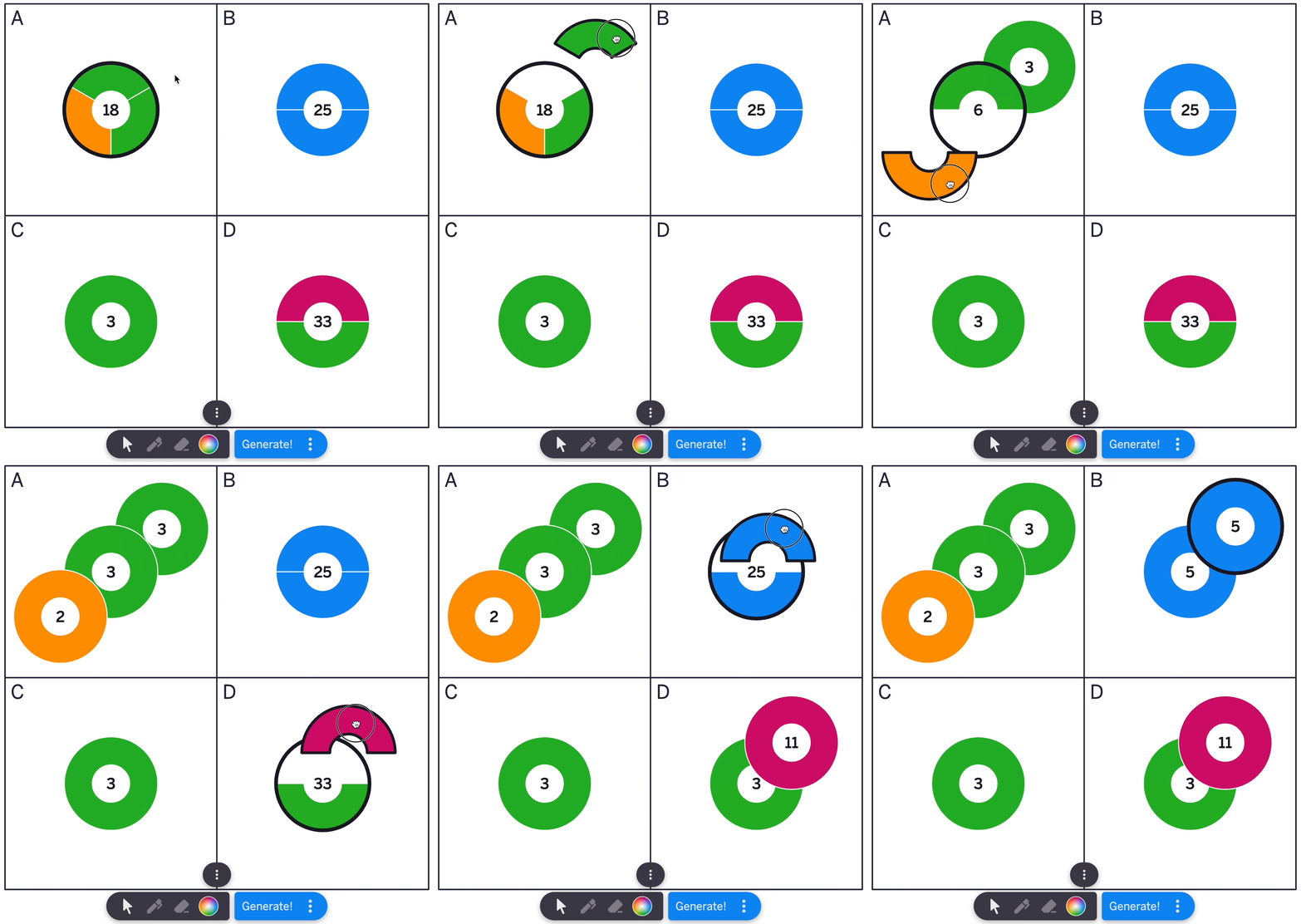
Using the Polypad WODB space opens up the option to using the interactions built into the Polypad tiles. For example, pulling apart the prime factor circles might help students think more deeply about why some numbers don’t belong and might add some value to the student discourse.
In another example, using the rename action on fractions and the unit toggle might create some interesting conversations.
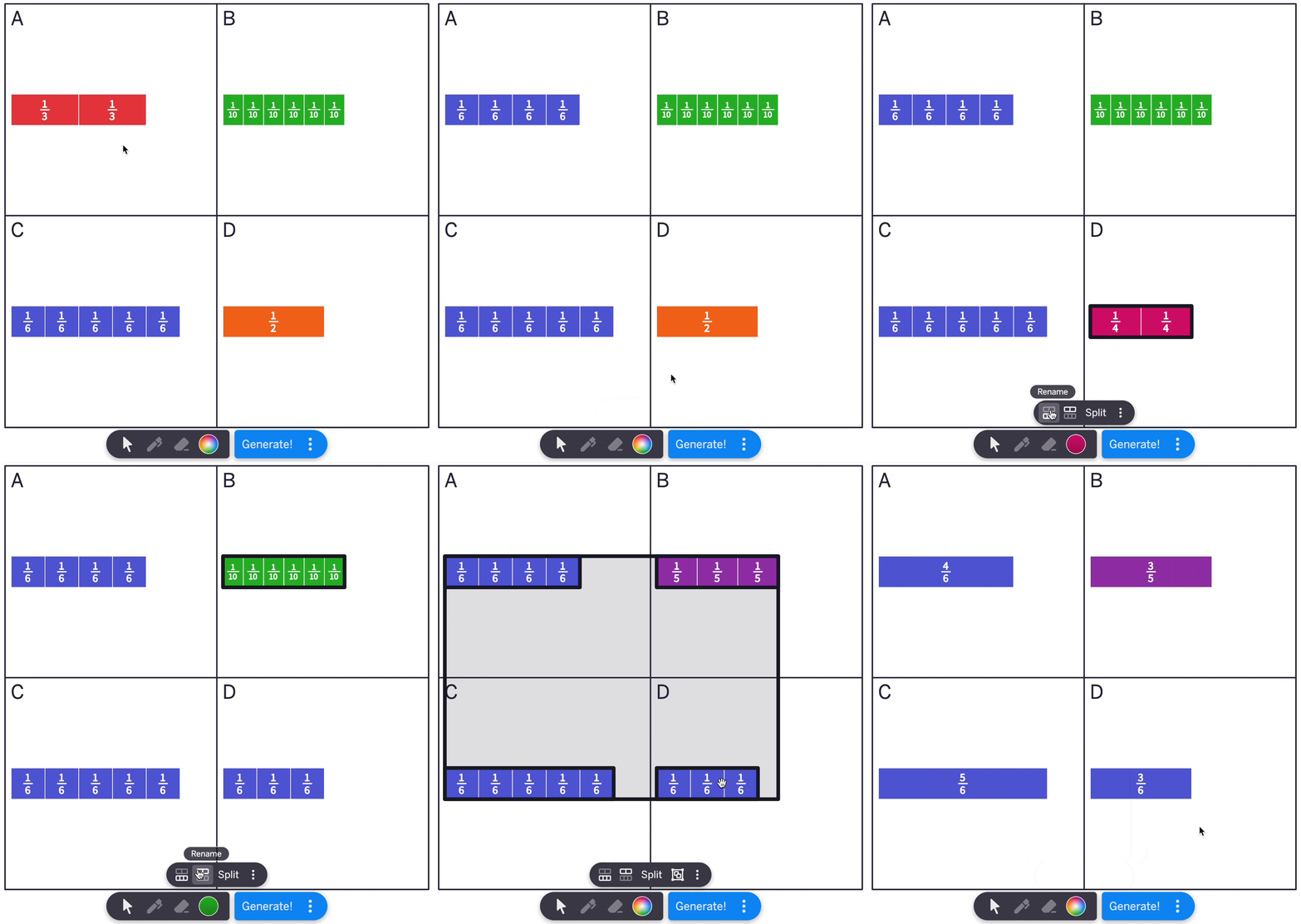
Most tiles in the Polypad WODB space have some interactivity built into them.
4) Student Use
Most uses cases of a WODB math routine involve the teacher projecting the image and the students thinking and discussing either individually or in small groups, followed by a teacher-facilitated whole-class discussion. The Polypad teams hopes that this space also creates more opportunities for students to create and respond to WODB creations of their own. Some ideas include:
- Using the WODB as a station during a math workshop model. For example, in small-groups, students could be invited to create some WODBs, record in their math journals the four representations, and work together to find a reason why each one does not belong. As they are working, if they create a WODB that does not appeal to them for whatever reason, they can just generate another.
- Students could also use the Polypad WODB space independently as part of an in-class assignment or practice outside of math class. Students could be invited to create and respond to a WODB in the same manner as described above.
Instructions
Using the Polypad WODB space is easy to do. Start by clicking on the ⋮ Option menu to select the tile type. Then, use the available input fields and toggles to set the desired parameters. Finally, close the menu and click generate!
The sketch tools at the bottom can be used to annotate student thinking. Each tile can also be moved around the screen as desired. As demonstrated above, be sure to pay attention to what actions appear in the action bar for each tile as using these actions may enhance the student and teacher experience.
Opening in Polypad
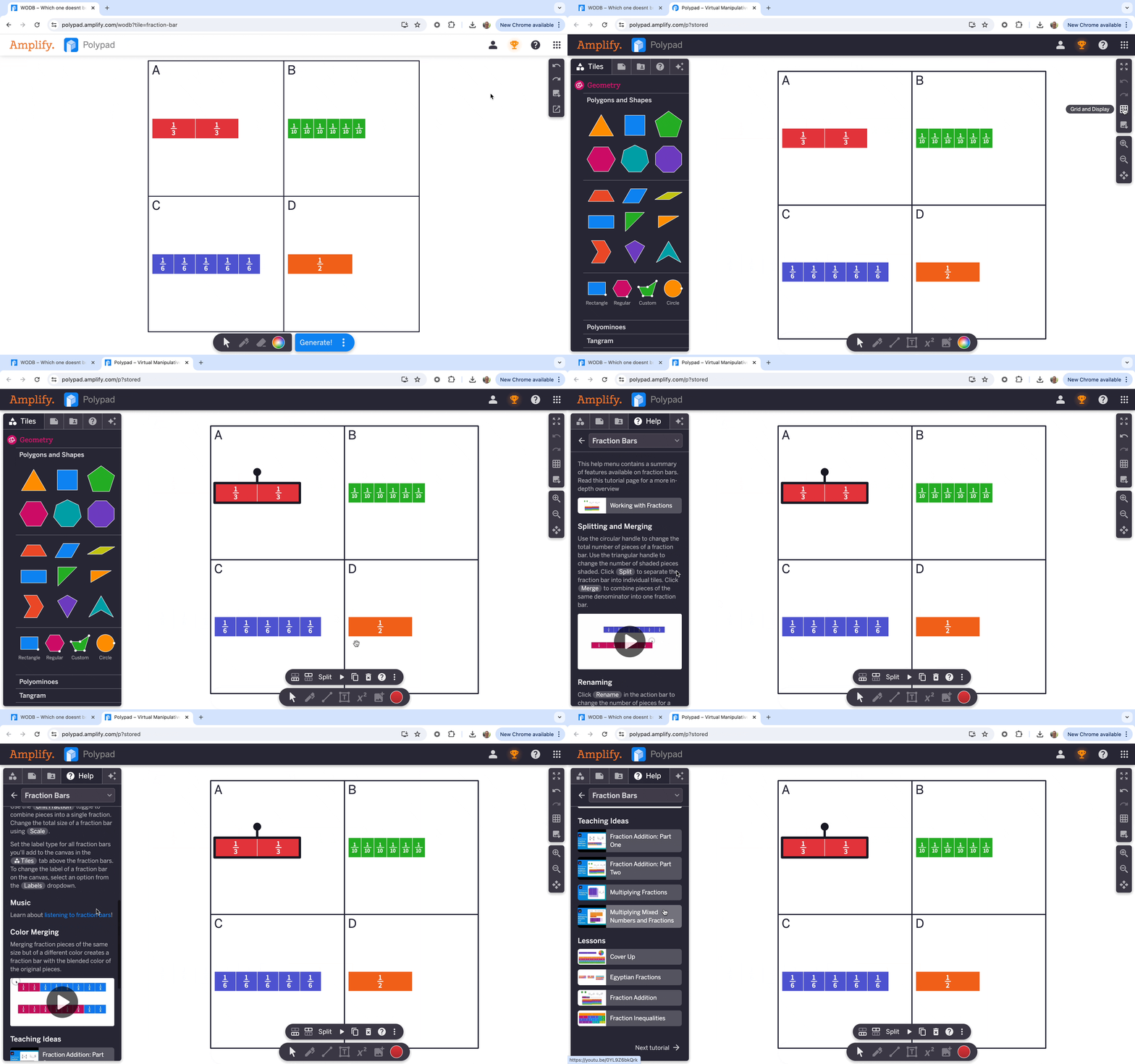
The Polypad WODB space does not have the full range of features and functionality of a blank Polypad. However, each WODB routine can be opened inside of the full Polypad by clicking the Open in Polypad button in the settings menu. Opening a WODB inside Polypad is a good option for those interested in learning more about some of the available options of each tile. Once the WODB is opened in Polypad, select the tile and click on the ? in the action bar to open a tutorial menu on that tile.
Saving Your Work
To save your creation, open the WODB in Polypad and save the Polypad to your library. Be sure to sign in to Polypad to save your work. Alternatively, click the Export button in the settings menu of the WODB to export the WODB as a PNG, JPG, or SVG file.
Share Your Creations and Feedback
The Polypad team would love to hear from teachers and students using the WODB space. We’re interested in seeing meaningful and thought-provoking WODB creations. Please consider sharing if you create one. Over time, we’d like to create a library of WODBs created in this space and will certainly credit you if we use your creation.
Additionally, we’re interested in hearing your suggestions for improving this resource. What changes do you have to suggest? What new features should be build? What new tiles would you like to see in this space? Complete this form to share creations, feedback, and more!